Fig vs. Yuka App: Which Food Scanner App Is Better?
Compare the two barcode-scanning apps in this Fig vs. Yuka app guide. Explore their key features and potential limitations to find the best fit for your needs.
Sign up for Olive
Both Fig and Yuka help answer the same question: “Is this product an optimal choice for me health-wise?” Their approaches, however, are entirely different. Fig explains how a food item fits into your dietary preferences, restrictions, and allergies. Yuka offers a comprehensive analysis of food and cosmetic products based on standardized quality and risk criteria.
This Fig vs. Yuka app guide presents both options in detail, covering:
- A comparison across five core evaluation points
- Each app’s strengths and weaknesses
- An all-encompassing alternative, Olive, that better supports a sustainable, clean-living strategy
Live cleaner and start feeling better today.
Sign up for OliveWhat Is Fig?
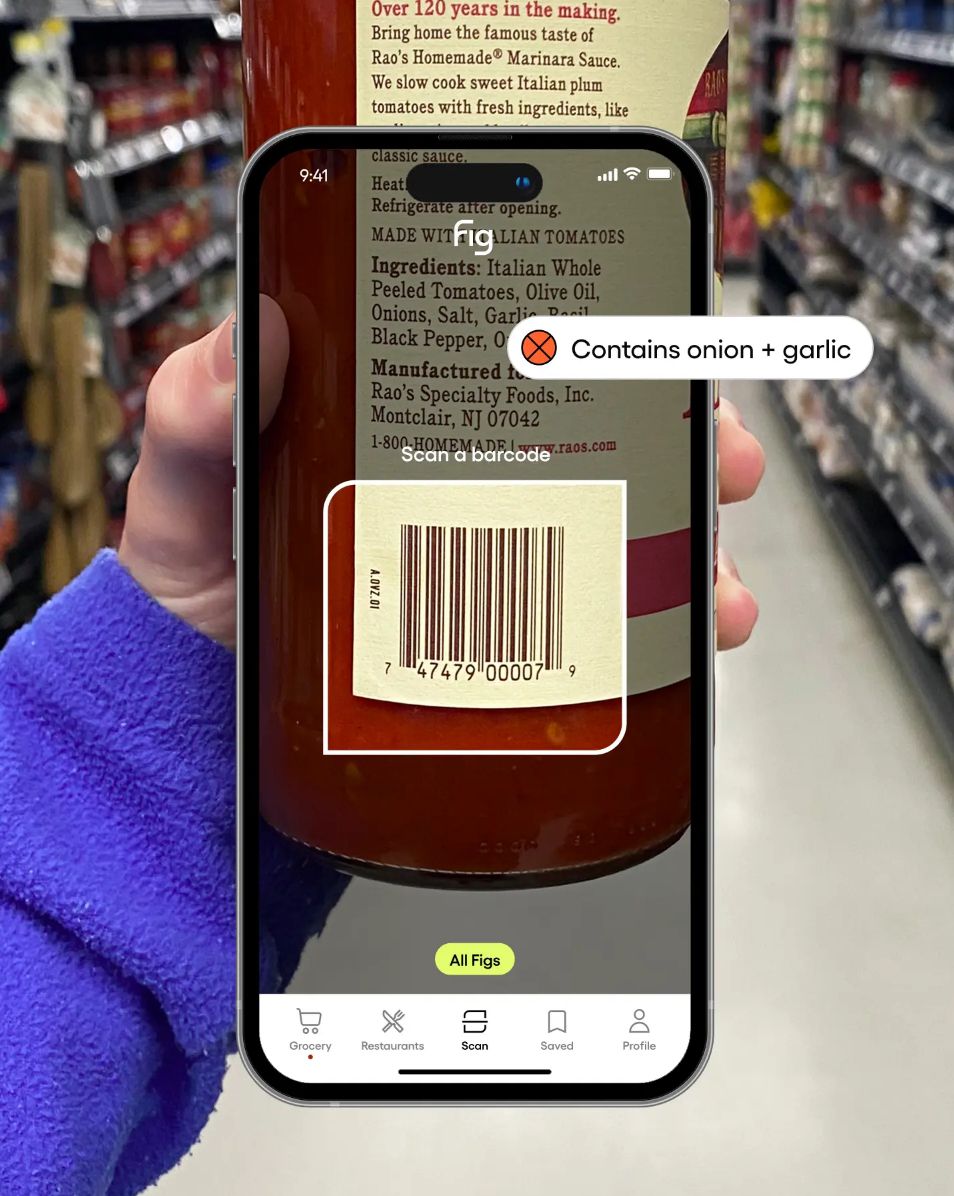
Fig is a food-scanning app designed for people with dietary restrictions. It serves as a shopping companion, helping you find foods that fit your dietary preferences and restrictions and making grocery shopping more focused and personalized.
The journey begins with creating Your Fig, which is essentially your personal food profile. You customize it through a quiz, specifying three categories:
- Food allergies
- Diets
- Avoided ingredients
Based on your answers, you access a database of products that match your dietary needs, along with stores where those items are available. Fig automatically compares each product’s ingredients and allergen statement with your specified diet, allergies, and avoidances, flagging potential incompatibilities.
You can also scan a product’s barcode or a restaurant menu item, inspect ingredients, and tap flagged items to learn why they may not fit your needs. Fig uses a color-coded system to present the results:
- Green check: No ingredients to avoid
- Yellow dash: May not fit your needs and require further research
- Red X: Doesn’t fit your specified preferences
Currently, Fig supports more than 2,000 diets, allergies, and ingredient preferences, including gluten-free, paleo, vegan, Whole30, and low FODMAP. You can also adjust the severity level of individual restrictions.
The app is free to use for five monthly scans and unlimited searches. It also offers Fig+, a premium version that unlocks unlimited scans, multiple Fig profiles, grocery-store filtering, and Fig Restaurants. Fig+ includes a seven-day free trial, after which the annual subscription applies.
The app is available on both iOS and Android devices, but is currently limited to the United States.
What Is Yuka?
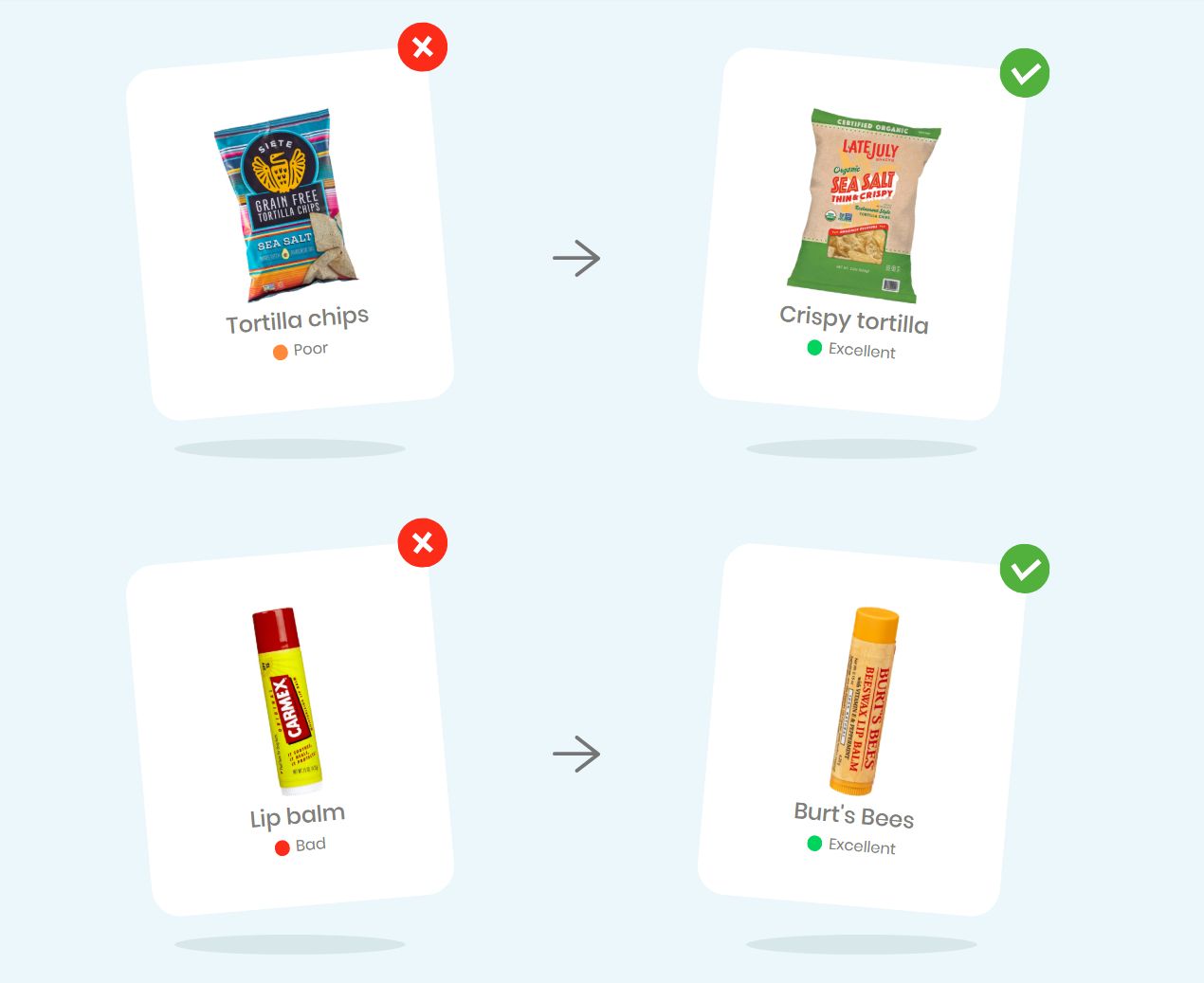
Yuka is a mobile app that scans food and cosmetic products. By broadening its scope beyond food, the app serves as a comprehensive shopping companion, allowing you to check around four million food products and two million cosmetic products through its growing database.
Yuka’s food-scanning functionality evaluates products based on three key components:
- Nutritional quality: Based on Nutri-Score, which assesses the nutritional quality using factors such as sugar, sodium, saturated fat, calories, fiber, and protein, and accounts for 60% of the Yuka score.
- Presence of additives: Each additive in a food item is classified as risk-free (green), limited risk (yellow), moderate risk (orange), or high risk (red). This variable accounts for 30% of the score.
- Organic dimension: The remaining 10% is awarded to organic products that carry a national or international organic certification.
Cosmetic products are evaluated for potential health and environmental risks, including allergenic, irritant, or endocrine-disrupting effects. Yuka applies the same color-coded system as Fig: red indicates high risk, orange moderate risk, yellow low risk, and green no identified risk.
If a product is poorly rated, Yuka recommends a better-rated alternative from the same category. While many of the app’s core functions are available for free, you can opt for a premium version for additional features like offline mode, manual product searches, unlimited history, and food preference-based alerts.
Yuka uses an open-pricing model, with annual subscriptions currently starting at $10 per year.
See how Yuka stacks up against other leading options in our best Yuka alternatives guide.
Instant Barcode Scan
Allergen Detection
Clear Ingredient Insights
Get Personalized Suggestions
Fig vs. Yuka: How They Compare Across 5 Key Areas
While they may appear similar at first glance, Fig and Yuka have notable differences. The following sections compare both across five key areas:
- Scanning capabilities and scope
- Rating methodology
- Personalization
- Shopping guidance
- Pricing and accessibility
1. Scanning Capabilities and Scope
One of the biggest distinctions between Fig and Yuka is the scope of products you can scan and inspect.
Fig is primarily focused on food. It scans grocery products and recommends options that match the dietary preferences and restrictions set in your Fig profile. Through its premium Fig Restaurants feature, it also helps you find restaurants and menu items that may suit your dietary needs.
Yuka expands its scope to include cosmetics and personal-care products, making it a more comprehensive option for shopping decisions.
However, while Yuka expands coverage beyond food, both apps are primarily designed around product evaluation at the point of purchase.
If you’re looking for a broader health companion rather than just a food scanner, Olive lets you scan food, personal care, water, and other household products in one app. Beyond flagging concerning ingredients and products, Olive also helps you build healthier habits over time by replacing poorly rated pantry staples with cleaner alternatives. Try Olive's 5-minute quiz to get started.
2. Rating Methodology
Fig and Yuka approach product analysis from two different perspectives.
Fig assesses whether a food product matches the dietary preferences, allergies, and ingredients to avoid in your personal profile. Instead of assigning an overall quality rating, it uses green, yellow, and red symbols to highlight specific ingredients that fit your preferences, may require further research, or conflict with your restrictions.
Yuka relies on a more standardized rating methodology that isn’t specific to individual preferences. Food products receive a score from 0 to 100, with nutritional quality accounting for 60%, the presence of additives accounting for 30%, and organic certification accounting for 10%. Cosmetics are rated separately based on the potential health and environmental risks associated with their ingredients.
The better performer in this category depends on your priorities. Users with dietary restrictions or allergies may be more inclined to Fig’s highly personalized, dietary-conscious approach, while Yuka takes a more generalized methodology to keep ratings consistent across food and cosmetic products.
3. Personalization
Personalization is at the core of the Fig experience. The user journey starts with and fully depends on Your Fig, a profile tailored to your dietary preferences, avoided ingredients, existing allergies, and selected severity levels.

These preferences tailor the products and ingredient warnings to your profile. With Fig+, you can also create multiple profiles to accommodate the different dietary needs of household members.
Yuka relies on a standardized ranking system that doesn’t adapt to individual needs. Personalization is available only through Yuka Premium, which allows you to set up preferences such as avoiding ingredients like gluten, palm oil, and lactose. The app then alerts you when scanned foods conflict with those preferences, but they don’t necessarily shape the overall Yuka score.
4. Shopping Guidance
Both apps allow you to scan products with your phone’s camera for instant results while grocery shopping. Additionally, both Fig and Yuka recommend more suitable alternatives. Fig suggests products that match your dietary profile, while Yuka recommends healthier, better-rated swaps for poorly rated products. Fig remains useful primarily in the grocery aisle, and Yuka can also offer guidance when choosing cosmetics and personal-care products.
The biggest difference in their shopping guidance is the store directory. With Fig, you can browse suitable products across different stores and check their availability, which isn’t the case with Yuka. Yuka doesn’t offer a list of stores; instead, it focuses on helping you find cleaner alternatives within the same product category.
5. Pricing and Accessibility
Both apps offer free versions, but the extent of access differs considerably.
Fig’s free version includes unlimited product searches but limits barcode scanning to five products per month. The premium subscription unlocks unlimited scans, multiple profiles, grocery-store filtering, and Fig Restaurants. You get a seven-day free trial, after which the annual subscription begins. Fig doesn’t list the subscription price on its website, but the cost may vary depending on current promotions.
Yuka imposes no limits on its core scanning and product-rating features. With a paid version starting at $10, you gain access to more advanced features, including personalized food alerts, manual product searches, unlimited history, and offline scanning.
While both apps are available on iOS and Android, their geographic accessibility differs. Fig is currently limited to users in the United States, while Yuka is available in several countries, including the U.S., Canada, the United Kingdom, Australia, France, Germany, and Italy.
Yuka vs. Fig: Which App Comes Out on Top?
Yuka and Fig offer streamlined shopping guidance and food analysis, but on different levels. The following table contrasts their core features and limitations:
| Yuka App | Fig |
|---|---|
| Scans food and cosmetic products | Scans food products |
| Uses a standardized rating system based on product quality and potential ingredient risks rather than individual preferences | Relies on users’ personalized profiles, evaluating products based on dietary preferences, restrictions, and allergies |
| Acts primarily as a barcode scanner and doesn’t offer a store-based directory | Provides a database of compatible products organized by store |
| Offers unlimited access to its core scanning features, with advanced tools available through a paid subscription | Limits free users to five product scans per month |
| Available in the U.S., Canada, Australia, and several European countries | Available only in the U.S. |
Yuka and Fig each address a specific part of the clean-living journey, but neither app extends the approach across the entire household.
Olive casts a wider net, spanning food, cosmetics, personal care, water, and sustainable weight loss. As a comprehensive health companion, it brings these areas together and offers science-backed guidance to help users build healthier, lasting habits.
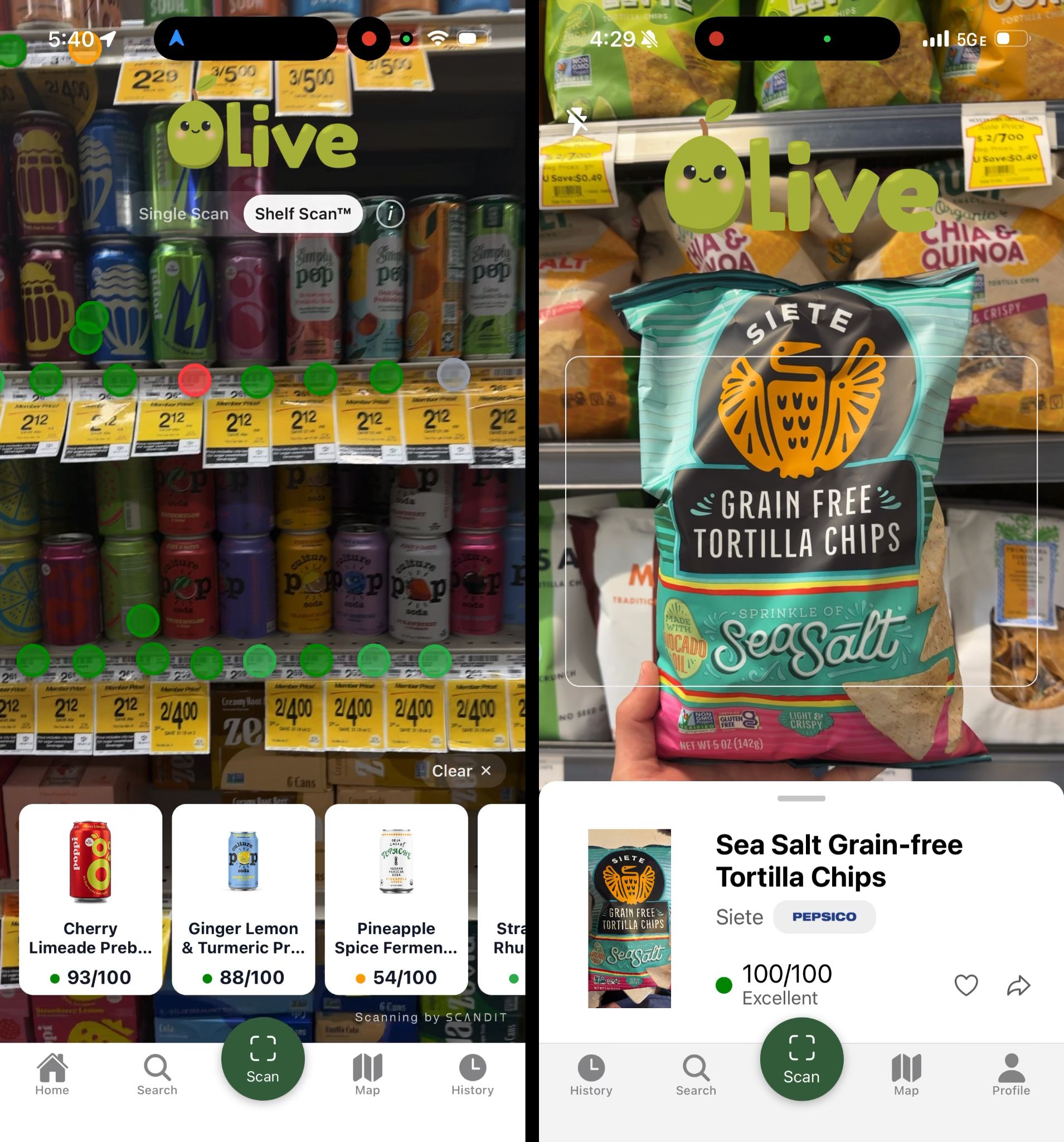
Experience Holistic Health and Well-Being Support With Olive
Olive is your trusted ally if you’re looking to make healthier choices across products and habits that shape your everyday life. With the app, you can:
- Understand what your food and water contain
- Review if your skincare essentials and household staples may be hurting your health
- Gradually update your pantry, cabinet, and daily routines to build habits that stick
Your Olive journey begins with the 28-Day Kitchen Detox Challenge, a guided pantry reset that helps you identify poorly rated products and replace them with cleaner alternatives.
For existing products or new items you bring into your pantry, just scan the barcode to receive an Olive score from 0 to 100 based on component sub-scores, allergen flags, detected toxins, and processing level, then discover cleaner substitutes. You can also check bottled water for known contaminants.
Try Olive for free on iOS or Android.
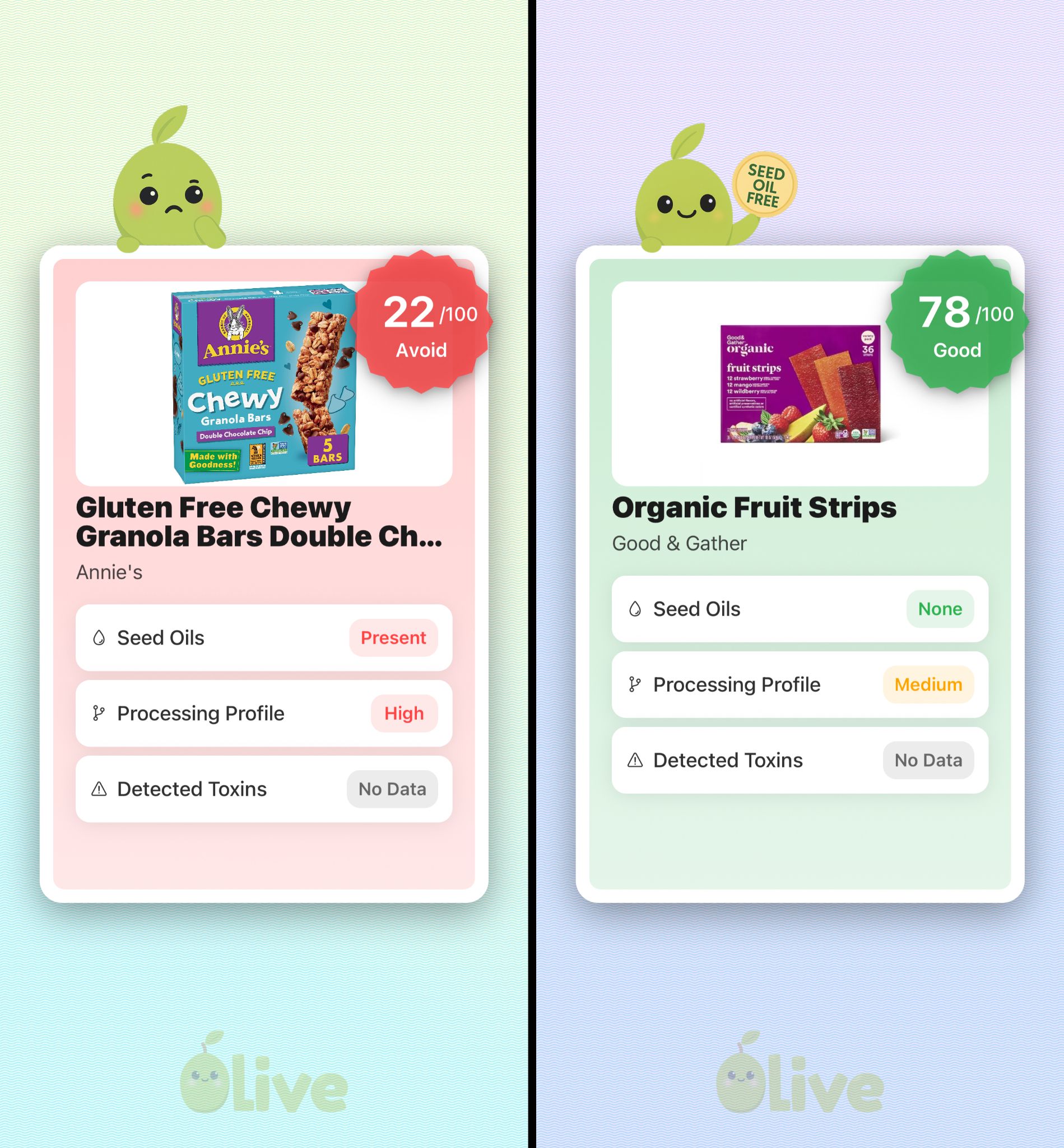
Olive goes beyond food and water to help you make informed choices about cosmetics and personal-care products. Scan your everyday products to explore individual ingredient ratings and better-rated swaps within the same category. Olive’s product analysis is based on independent laboratory findings across approximately 400 products tested for lead, cadmium, mercury, and arsenic.
Your clean-living journey is further supported through 1:1 health coaching. The program is tailored to your individual health goals and includes a personalized expert-led plan. You can also access lab-tested peptide protocols with medical supervision and receive personalized guidance designed to support lasting results.
Olive offers a 28-day guarantee: if you don't see improvements within 28 days, you'll receive a full refund, no questions asked.
Olive is fully independent and funded through user subscriptions. There are no affiliate commissions and paid partnerships to influence the scores. Take Olive's 5-minute quiz to try the app for free.
I absolutely love this app! I've used a few different food/product scanner apps and I've been so pleased with how Olive rates based on seed oils, additives, processing and chemicals. I highly recommend this app over any of the others I've used. As someone who prioritizes her health and eats clean, Olive takes the guesswork out of it so I can feel confident in my selections and what I put in my body.

Take the guesswork out of shopping
- Scan food, personal care and home products
- Independent scores backed by real lab testing
- Cleaner swaps for you, and everyone you shop for
Instant Barcode Scan
Allergen Detection
Clear Ingredient Insights
Get Personalized Suggestions
Recommended for you

 Alexander Klein
Pore-Clogging Ingredients Checker: Strongest Options & Key Considerations
Learn how pore-clogging ingredient checkers function and how the leading platforms compare across scanning and search capability, methodology, and reliability.
 Alexander Klein
Happy Baby Pouches: Safe and Nutritious? | Parent's Guide
Discover everything you need to know about Happy Baby Pouches: A Parent's Guide to ensuring safe and nutritious choices amidst heavy metals concerns.
100% Independent.
Always.
We never monetize through brand deals, affiliate links, or ads — so you can trust our recommendations are always aligned with our users.
Frequently Asked Questions
What is the Olive app and how does it work?
Olive is a holistic health companion built to help you live cleaner and feel better. Scan a barcode and Olive shows you exactly what is in your food, your personal care products, and the things you bring into your home, then points you to a clean swap that actually makes a difference.
Inside the app you also get:
- Health coaching
- FDA recall alerts
- Prop 65-aligned baby food product lookups
- Proprietary lab testing data on your favorite products
- Video-assisted kitchen detox walkthroughs
- Maps of healthy restaurants and farmers’ markets near you
- Symptom tracking and logging
- Peptide and supplement dosage tracking
How does the Olive food and cosmetic ingredient scanner work?
You scan a product. Olive scores it from 0 to 100 (higher is cleaner), explains in plain language why it scored that way, flags the harmful stuff like seed oils, additives, hidden sugars, contaminants, and endocrine disruptors, and points you to a cleaner swap.
From there, Olive helps you actually change: a 28-day kitchen detox to start, habit building, coaching, and doctor-supervised peptide protocols.
What starts with one scan can end in more energy, a clear head, and a shopping cart you finally trust.
Which products can I scan: food, cosmetics, or bottled water?
All three. Scan food and drinks for the 0 to 100 score, with a breakdown of toxins, additives, processing, seed oils, and sugar.
Scan skincare, makeup, sunscreen, shampoo, and other personal care products and Olive rates every ingredient green, yellow, or red with a plain-language reason for the rating.
Scan bottled water and Olive checks it for contaminants such as fluoride, heavy metals, and microplastics.
How does Olive ensure the accuracy of its scan results?
We do our own independent lab testing for heavy metals (lead, cadmium, mercury, and arsenic) across roughly 400 products so far. That is more testing than most companies do, including Consumer Reports.
Our cosmetic ingredient rating system was built with the head of a chemical toxin working group, so every ingredient carries a documented reason behind its rating.
And Olive is independent. No ads, no affiliates, and we do not take money to change scores. Your subscription is what funds the testing, so Olive answers to you. All of it runs on a database of 10M+ products.
Can Olive be customized to my dietary needs?
Yes. Set your goals, your diet, and your allergies, and every score and swap adjusts to you. Keto, paleo, heart-healthy, Mediterranean, halal, kosher, gluten-free, and dairy-free are all covered.
If you react to gluten, dairy, nuts, soy, or anything else, Olive flags it before it reaches your cart.
Is Olive available for both Android and iOS?
Yes. Olive is live on both. Download Olive on the Apple App Store or get it on Google Play.
Is my data secure when I use Olive?
Yes. Your privacy comes first. Olive protects your personal information with strong security protocols, and your scans, your pantry, and your health details stay yours. You can read the details in our privacy policy.
How do I get started with Olive?
Start with the free quiz. It takes about five minutes, asks about your goals, your symptoms, and what is already in your kitchen, then hands you a personalized plan. Try Olive free.
Start with one scan.
Scan your food, personal care and home products
Independent scores backed by real lab testing
Cleaner swaps for you, and everyone you shop for